OpenccNetLib 1.4.1
dotnet add package OpenccNetLib --version 1.4.1
NuGet\Install-Package OpenccNetLib -Version 1.4.1
<PackageReference Include="OpenccNetLib" Version="1.4.1" />
<PackageVersion Include="OpenccNetLib" Version="1.4.1" />
<PackageReference Include="OpenccNetLib" />
paket add OpenccNetLib --version 1.4.1
#r "nuget: OpenccNetLib, 1.4.1"
#:package OpenccNetLib@1.4.1
#addin nuget:?package=OpenccNetLib&version=1.4.1
#tool nuget:?package=OpenccNetLib&version=1.4.1
OpenccNet





OpenccNetLib is a fast and efficient .NET library for converting Chinese text, offering support for Simplified ↔ Traditional, Taiwan, Hong Kong, and Japanese Kanji variants. Built with inspiration from OpenCC, this library is designed to integrate seamlessly into modern .NET projects with a focus on performance and minimal memory usage.
Table of Contents
Features
- Fast, multi-stage Chinese text conversion using prebuilt dictionary unions
(optimized with static caching and zero-allocation hot paths) - Supports:
- Simplified ↔ Traditional Chinese
- Taiwan Traditional (T) ↔ Simplified / Traditional
- Hong Kong Traditional (HK) ↔ Simplified / Traditional
- Japanese Kanji Shinjitai ↔ Traditional Kyujitai
- Accurate handling of Supplementary Plane CJK (U+20000+) characters
(correct surrogate-pair detection and matching) - Optional punctuation conversion
- Thread-safe and suitable for high-throughput parallel processing
- Office document & EPUB conversion (pure in-memory):
.docx(Word),.xlsx(Excel),.pptx(PowerPoint),.epubbyte[] → byte[]conversion with full XML patching- Async/await supported (
ConvertOfficeBytesAsync) - Zero temp files required; safe for Web, Server, and WASM/Blazor hosts
- .NET Standard 2.0 compatible
(cross-platform: Windows, Linux, macOS; supported on .NET Core 2.0+, .NET 5+, .NET 6/7/8/9/10 LTS)
Installation
- Add the library to your project via NuGet or reference the source code directly.
- Add required dependencies of dictionary files to library root.
dicts\dictionary_maxlength.zstdDefault dictionary file.dicts\*.*Others dictionary files for different configurations.
Install via NuGet:
dotnet add package OpenccNetLib
Or, clone and include the source files in your project.
Usage
Basic Example
using OpenccNetLib;

// Recommended: use the enum-based constructor
var opencc = new Opencc(OpenccConfig.S2T); // Simplified → Traditional

string traditional = opencc.Convert("汉字转换测试");
Console.WriteLine(traditional);
// Output: 漢字轉換測試
Or, using the legacy string-based configuration:
using OpenccNetLib;
var opencc = new Opencc("s2t"); // Simplified to Traditional
string traditional = opencc.Convert("汉字转换测试");
Console.WriteLine(traditional);
// Output: 漢字轉換測試
Supported Configurations
| Config | Description |
|---|---|
| s2t | Simplified → Traditional |
| t2s | Traditional → Simplified |
| s2tw | Simplified → Traditional (Taiwan) |
| tw2s | Traditional (Taiwan) → Simplified |
| s2twp | Simplified → Traditional (Taiwan, idioms) |
| tw2sp | Traditional (Taiwan, idioms) → Simplified |
| s2hk | Simplified → Traditional (Hong Kong) |
| hk2s | Traditional (Hong Kong) → Simplified |
| t2tw | Traditional → Traditional (Taiwan) |
| tw2t | Traditional (Taiwan) → Traditional |
| t2twp | Traditional → Traditional (Taiwan, idioms) |
| tw2tp | Traditional (Taiwan, idioms) → Traditional |
| t2hk | Traditional → Traditional (Hong Kong) |
| hk2t | Traditional (Hong Kong) → Traditional |
| t2jp | Traditional Kyujitai → Japanese Kanji Shinjitai |
| jp2t | Japanese Kanji Shinjitai → Traditional Kyujitai |
Example: Convert with Punctuation
var opencc = new Opencc("s2t");
string result = opencc.Convert("“汉字”转换。", punctuation: true);
Console.WriteLine(result);
// Output: 「漢字」轉換。
Example: Switching Config Dynamically
using OpenccNetLib;

var opencc = new Opencc("s2t");

// Initial conversion
string result = opencc.Convert("动态切换转换方式");
Console.WriteLine(result);  // Output: 動態切換轉換方式

// Switch config using string
opencc.Config = "t2s";  // Also valid: opencc.SetConfig("t2s")
result = opencc.Convert("動態切換轉換方式");
Console.WriteLine(result);  // Output: 动态切换转换方式

// Switch config using enum (recommended for safety and autocomplete)
opencc.SetConfig(OpenccConfig.S2T);
result = opencc.Convert("动态切换转换方式");
Console.WriteLine(result);  // Output: 動態切換轉換方式

// Invalid config falls back to "s2t"
opencc.Config = "invalid_config";
Console.WriteLine(opencc.GetLastError());  // Output: Invalid config provided: invalid_config. Using default 's2t'.
💡 Tips
- Use
OpenccConfigenum for compile-time safety and IntelliSense support. - Use
GetLastError()to check if fallback occurred due to an invalid config. - You can also validate config strings with
Opencc.IsValidConfig("t2tw").
Direct API Methods
You can also use direct methods for specific conversions:
using OpenccNetLib;
var opencc = new Opencc();
opencc.S2T("汉字");
// Simplified to Traditional opencc.T2S("漢字");
// Traditional to Simplified opencc.S2Tw("汉字");
// Simplified to Taiwan Traditional opencc.T2Jp("漢字");
// Traditional to Japanese Kanji
// ...and more
Error Handling
If an error occurs (e.g., invalid config), use:
string error = opencc.GetLastError();
Console.WriteLine(error); // Output the last error message
Language Detection
Detect if a string is Simplified, Traditional, or neither:
using OpenccNetLib;
int result = Opencc.ZhoCheck("汉字"); // Returns 2 for Simplified, 1 for Traditional, 0 for neither
Console.WriteLine(result); // Output: 2 (for Simplified)
Using a Custom Dictionary
By default, OpenccNetLib uses the built-in Zstandard-compressed lexicon.
You can configure a custom dictionary (JSON, CBOR, or "baseDir/*.txt") before creating an Opencc instance:
using OpenccNetLib;

// Initialize once, using dictionaries from "./dicts/" (baseDir)
Opencc.UseCustomDictionary(DictionaryLib.FromDicts());

var opencc = new Opencc("s2t"); // Simplified to Traditional
string traditional = opencc.Convert("汉字转换测试");
Console.WriteLine(traditional); // Output: 漢字轉換測試
🆕 Office Document & EPUB Conversion (In-Memory, No Temp Files Required)
Starting from OpenccNetLib v1.3.2, the library now provides a pure in-memory Office / EPUB conversion API.
This allows converting .docx, .xlsx, .pptx, and .epub directly from byte[] to byte[], without touching the
filesystem.
This is ideal for:
- Web servers (ASP.NET Core)
- Blazor / WebAssembly
- JavaScript interop
- Desktop apps that want to avoid temp paths
- Security-restricted environments
✔ Supported formats
| Format | Description |
|---|---|
docx |
Word document (Office Open XML) |
xlsx |
Excel spreadsheet (Office Open XML) |
pptx |
PowerPoint presentation (Office Open XML) |
odt |
OpenDocument Text (LibreOffice / OpenOffice) |
ods |
OpenDocument Spreadsheet |
odp |
OpenDocument Presentation |
epub |
EPUB e-book (with correct uncompressed mimetype) |
📦 Example: Convert Office Document In-Memory
using OpenccNetLib;

var opencc = new Opencc("s2t"); // Simplified → Traditional

byte[] inputBytes = File.ReadAllBytes("sample.docx");

// New strongly-typed OfficeFormat enum (recommended)
byte[] outputBytes = OfficeDocConverter.ConvertOfficeBytes(
    inputBytes,
    format: OfficeFormat.Docx,
    converter: opencc,
    punctuation: false,
    keepFont: true
);

File.WriteAllBytes("output.docx", outputBytes);
🔁 Backward-Compatible String Overload
Existing string-based API still works:
byte[] outputBytes = OfficeDocConverter.ConvertOfficeBytes(
    inputBytes,
    format: "docx",   // legacy string format
    converter: opencc
);
No breaking changes — all existing code continues working.
⚡ Async API (Recommended for Server/Web)
var outputBytes = await OfficeDocConverter.ConvertOfficeBytesAsync(
    inputBytes,
    format: OfficeFormat.Docx,
    converter: opencc,
    punctuation: false,
    keepFont: true
);
- Fully async
- No blocking
- Safe for ASP.NET Core, MAUI, Blazor WebAssembly
String format async overload also remains available.
📁 Convert Files (Convenience wrappers)
OfficeDocConverter.ConvertOfficeFile(
    "input.docx",
    "output.docx",
    format: OfficeFormat.Docx,
    converter: opencc
);
Or async:
await OfficeDocConverter.ConvertOfficeFileAsync(
    "input.docx",
    "output.docx",
    format: OfficeFormat.Docx,
    converter: opencc
);
String-based overload:
OfficeDocConverter.ConvertOfficeFile(
    "input.docx",
    "output.docx",
    "docx",
    opencc
);
🆕 What's New in v1.4.0
Added
OfficeFormatenum
Strongly typed format selection for safer, cleaner API usage.Added enum-based overloads
ConvertOfficeBytes(byte[], OfficeFormat, …)ConvertOfficeBytesAsync(byte[], OfficeFormat, …)ConvertOfficeFile(string, string, OfficeFormat, …)ConvertOfficeFileAsync(string, string, OfficeFormat, …)
String format overloads retained for compatibility
("docx","xlsx","epub", etc.)
No breaking changes.Internal refactor
- Core engine now switches on
OfficeFormat - Cleaner logic
- Better performance
- Safer against typo bugs
- Easier to maintain
- Core engine now switches on
🔍 What does conversion do?
Inside the Office/EPUB container (ZIP), the library will:
- Extract only the relevant XML/XHTML parts
- Apply OpenCC text conversion (
s2t,t2s,t2tw,hk2s, etc.) - Preserve XML structure and formatting
- Optionally preserve fonts (
keepFont = true) - Rebuild the Office container as valid ZIP
- For EPUB: ensure
mimetypeis first uncompressed entry (EPUB spec)
🛡 Error Handling
If conversion fails (invalid format, corrupted ZIP, missing document.xml, etc.):
throw new InvalidOperationException("Conversion failed: ...");
A companion “Try” API may be added in future versions.
🧪 Unit Tested (MSTest)
OpenccNetLib includes integration tests for:
.docx(Word)- ZIP structure validation
- XML extraction correctness
- Chinese text conversion inside
word/document.xml - Round-trip verification
Example (OfficeDocConverterTests):
[TestMethod]
public void ConvertOfficeBytes_Docx_S2T_Succeeds()
{
    var opencc = new Opencc("s2t");
    var inputBytes = File.ReadAllBytes("滕王阁序.docx");

    var outputBytes = OfficeDocConverter.ConvertOfficeBytes(
        inputBytes, "docx", opencc);

    Assert.IsNotNull(outputBytes);

    using var ms = new MemoryStream(outputBytes);
    using var zip = new ZipArchive(ms, ZipArchiveMode.Read);

    Assert.IsNotNull(zip.GetEntry("word/document.xml"));
}
🚀 Why This Matters
- Zero temp files → perfect for cloud environments
- Memory-only pipeline → safer, faster, cleaner
- Cross-platform (Windows / macOS / Linux / WASM)
- Blazor and JavaScript-ready (byte[] in/out)
- No external dependencies (only built-in System.IO.Compression)
Performance
- Uses static dictionary caching, precomputed StarterUnion masks, and thread-local buffers for high throughput.
- Fully optimized for multi-stage conversion with zero-allocation hot paths.
- Suitable for real-time, batch, and parallel processing.
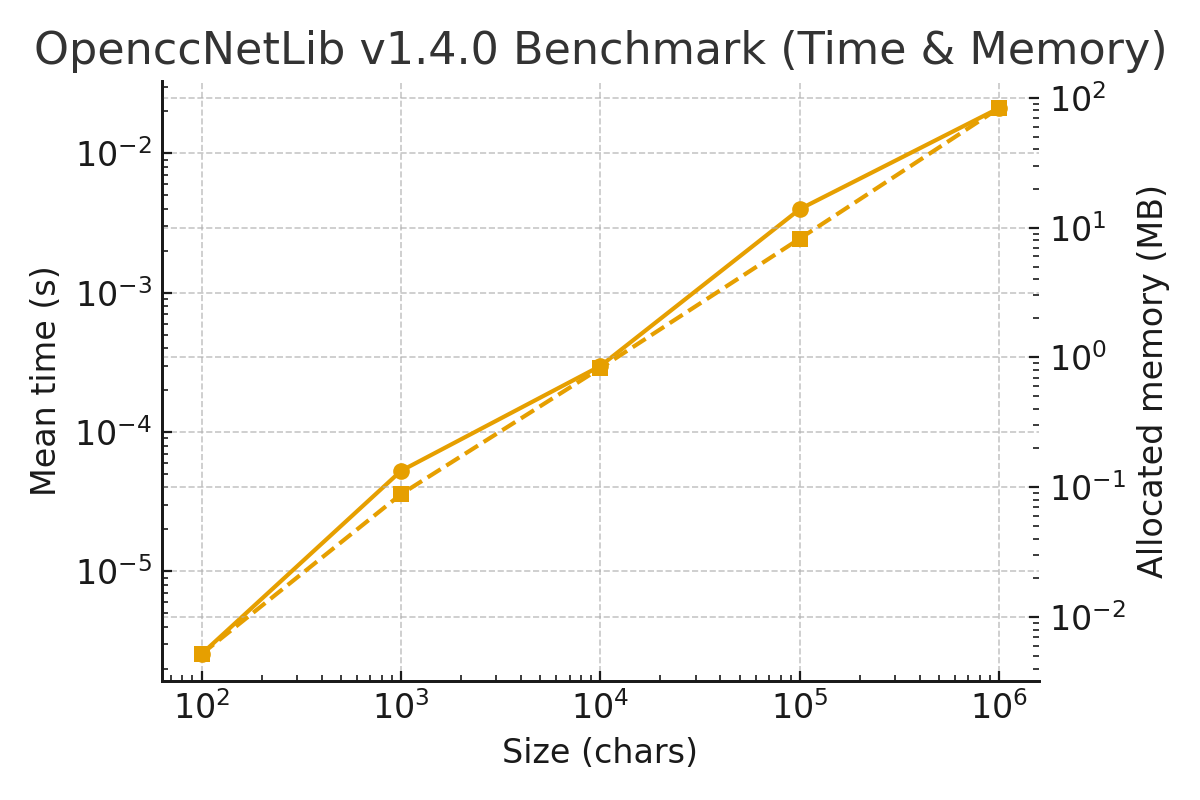
🚀 Performance Benchmark for OpenccNetLib 1.4.0
S2T Conversion (after Union-based Optimizations)
Environment
| Item | Value |
|---|---|
| BenchmarkDotNet | v0.15.6 |
| OS | Windows 11 (Build 26200.7171) |
| CPU | Intel Core i5-13400 (10C/16T @ 2.50 GHz) |
| .NET SDK | 10.0.100 |
| Runtime | .NET 10.0.0 (X64 RyuJIT x86-64-v3) |
| Iterations | 10 (1 warm-up) |
Results
| Method | Size | Mean | Error | StdDev | Min | Max | Rank | Gen0 | Gen1 | Gen2 | Allocated |
|---|---|---|---|---|---|---|---|---|---|---|---|
| BM_Convert_Sized | 100 | 2.55 µs | 0.05 µs | 0.03 µs | 2.53 µs | 2.63 µs | 1 | 0.515 | – | – | 5.3 KB |
| BM_Convert_Sized | 1,000 | 52.61 µs | 0.42 µs | 0.28 µs | 52.39 µs | 53.23 µs | 2 | 8.789 | – | – | 90.3 KB |
| BM_Convert_Sized | 10,000 | 297.87 µs | 11.36 µs | 7.52 µs | 288.43 µs | 312.53 µs | 3 | 83.496 | 19.043 | – | 845.9 KB |
| BM_Convert_Sized | 100,000 | 3.98 ms | 52.31 µs | 27.36 µs | 3.93 ms | 4.02 ms | 4 | 890.625 | 367.188 | 117.188 | 8,430.5 KB |
| BM_Convert_Sized | 1,000,000 | 21.17 ms | 594.50 µs | 393.23 µs | 20.87 ms | 22.01 ms | 5 | 8,468.75 | 1,468.75 | 625.000 | 85,580.4 KB |
Summary
- 100 chars → ~2.5 µs
- 1,000 chars → ~52 µs
- 10,000 chars → ~0.3 ms
- 100,000 chars → ~4 ms
- 1,000,000 chars (1M) → ~21 ms
This places OpenccNetLib 1.4.0 among the fastest .NET-based CJK converters,
on par with optimized Rust implementations and significantly faster than traditional trie-based segmenters.
⏱ Relative Performance Chart
🟢 Highlights (OpenccNetLib v1.4.0)
🚀 Performance Gain
Over 50% faster compared to earlier 1.x releases.
1M characters convert in ≈ 21 ms — roughly 47–50 million chars/sec
(≈ 95–100 MB/s) on a mid-range Intel i5-13400.📌 Predictable, Linear Performance (Performance Guarantee)
Both time and memory usage scale linearly with input size.
No spikes, no nonlinear slow paths, no GC stalls — ensuring:- deterministic latency for large documents
- consistent batch processing throughput
- stable behavior in multithreaded or server environments
This is the ideal profile for a high-performance conversion engine.
⚙️ Major Improvement Sources
- StarterUnion dense-table lookup
Eliminates per-key scanning; provides instant access to
(starterUnits, cap, minLen, 64-bit length mask). - Mask-first gating + shortest/longest bounds
Nearly all non-matching starters exit in a single branch. - Dropped
maxWordLengthparameter
Simplifies control flow and removes redundant checks. - Zero-allocation hot loop
UsesSpan<char>, thread-localStringBuilder, and rented buffers. - Optimized surrogate fast-path
UsingIsHs/IsLslookup tables removes per-iteration UTF-16 checks.
- StarterUnion dense-table lookup
📈 GC Profile
Extremely stable:- Allocations come mostly from final output & temporary key buffers.
- Very low Gen 1 activity; Gen 2 appears only on very large inputs (≥1M chars).
- No GC spikes even under high parallelism.
🏁 Throughput
- Sustained ≈ 95 MB/s (S2T) on .NET 10 RyuJIT x86-64-v3.
- Large documents (multi-million chars) convert in 40–50 ms, consistently.
💾 Memory Overhead
- 1M characters: ~85 MB allocated (includes output + chunk buffers).
- Only +2–3 MB vs earlier versions — an excellent tradeoff for major speed gains.
🧩 Future Optimization Ideas
- Tune splitting batch sizes (128–512 chars) for real workloads.
- Add thread-local scratch buffers (
localInit,localFinally) to reduce Gen 0 churn. - Multi-target .NET 8+ for span-based
Dictionary.TryGetValue. - Add micro-tables for extremely common keys (length 1–2).
- Explore SIMD-accelerated starter filtering.
Note:
Since OpenccNetLib v1.3.x, the global lazyPlanCacheeliminates repeated union builds,
reducing GC pressure and ensuring consistently fast conversions across all instances.
API Reference
Opencc Class
🔧 Constructors
Opencc(string config = null)
Creates a new converter using a configuration name (e.g.,"s2t","t2s").
This overload is compatible with existing code but requires string-based config.Opencc(OpenccConfig configEnum)
Creates a new converter using the strongly-typedOpenccConfigenum
(e.g.,OpenccConfig.S2T,OpenccConfig.T2S).
Recommended for all new code because it avoids magic strings.
🔁 Conversion Methods
string Convert(string inputText, bool punctuation = false)
Convert text according to the current config and punctuation mode.string S2T(string inputText, bool punctuation = false)string T2S(string inputText, bool punctuation = false)string S2Tw(string inputText, bool punctuation = false)string Tw2S(string inputText, bool punctuation = false)string S2Twp(string inputText, bool punctuation = false)string Tw2Sp(string inputText, bool punctuation = false)string S2Hk(string inputText, bool punctuation = false)string Hk2S(string inputText, bool punctuation = false)string T2Tw(string inputText)string T2Twp(string inputText)string Tw2T(string inputText)string Tw2Tp(string inputText)string T2Hk(string inputText)string Hk2T(string inputText)string T2Jp(string inputText)string Jp2T(string inputText)
⚙️ Configuration
Opencc supports both string-based and enum-based configuration APIs.
Internally, all configurations are stored as a strongly typed OpenccConfig identifier;
string APIs are provided for backward compatibility and convenience.
Recommended: Use the
OpenccConfigenum–based APIs whenever possible.
String-based APIs are fully supported but are considered legacy-style convenience helpers.
Instance Configuration APIs
string Config { get; set; }
Gets or sets the current conversion configuration using a canonical string
(for example,"s2t","tw2sp").
Invalid values automatically fall back to"s2t"and update the internal error status.void SetConfig(string config)
Sets the conversion configuration using a string name.
Comparison is case-insensitive and ignores surrounding whitespace.
Falls back to"s2t"if the value is invalid.void SetConfig(OpenccConfig configEnum)
Sets the conversion configuration using a strongly typedOpenccConfigenum value.
This is the preferred and recommended approach for type safety, IDE support, and interop scenarios (P/Invoke, JNI, bindings).string GetConfig()
Returns the current configuration as a canonical lowercase string
(for example,"s2tw").OpenccConfig GetConfigId()
Returns the current configuration as anOpenccConfigenum value.
This reflects the authoritative internal configuration state.string GetLastError()
Returns the most recent configuration-related error message, if any.
Anullvalue indicates that no configuration error is currently recorded.
📋 Validation and Helper APIs
The following static helpers are provided for validation, parsing, and discovery of supported configurations:
static bool TryParseConfig(string config, out OpenccConfig result)
Attempts to parse a configuration string into the correspondingOpenccConfigenum value.
Comparison is case-insensitive and ignores leading or trailing whitespace.
Returnsfalseif the input isnull, empty, or not a recognized configuration.static bool IsValidConfig(string config)
Determines whether the specified string represents a supported OpenCC configuration.static IReadOnlyCollection<string> GetSupportedConfigs()
Returns a read-only collection of all supported configuration names
(canonical lowercase strings).
The returned collection is stable and does not allocate on each call.static int ZhoCheck(string inputText)
Detects whether the input text is likely:2→ Simplified Chinese1→ Traditional Chinese0→ Neither / unknown
Notes
- All configuration inputs ultimately resolve to a single internal
OpenccConfigidentifier. - Invalid configuration values never throw; they safely fall back to
"s2t". - Enum-based APIs are future-proof and align with the C API, Rust core, and other language bindings.
Dictionary Data
- Dictionaries are loaded and cached on first use.
- Data files are expected in the
dicts/directory (seeDictionaryLibfor details).
Add-On CLI Tools (Separated from OpenccNetLib)
OpenccNet dictgen
Description:
  Generate OpenccNetLib dictionary files.

Usage:
  OpenccNet dictgen [options]

Options:
  -f, --format <format>      Dictionary format: zstd|cbor|json [default: zstd]
  -o, --output <output>      Output filename. Default: dictionary_maxlength.<ext>
  -b, --base-dir <base-dir>  Base directory containing source dictionary files [default: dicts]
  -u, --unescape             For JSON format only: write readable Unicode characters instead of \uXXXX escapes
  -?, -h, --help             Show help and usage information
OpenccNet convert
Description:
  Convert text using OpenccNetLib configurations.

Usage:
  OpenccNet convert [options]

Options:
  -i, --input              Read original text from file <input>
  -o, --output             Write original text to file <output>
  -c, --config (REQUIRED)  Conversion configuration: s2t|s2tw|s2twp|s2hk|t2s|tw2s|tw2sp|hk2s|jp2t|t2jp
  -p, --punct              Punctuation conversion. [default: False]
  --in-enc                 Encoding for input: UTF-8|UNICODE|GBK|GB2312|BIG5|Shift-JIS [default: UTF-8]
  --out-enc                Encoding for output: UTF-8|UNICODE|GBK|GB2312|BIG5|Shift-JIS [default: UTF-8]
  -?, -h, --help           Show help and usage information
OpenccNet office
Description:
  Convert Office documents or Epub using OpenccNetLib.

Usage:
  OpenccNet office [options]

Options:
  -i, --input              Input Office document <input>
  -o, --output             Output Office document <output>
  -c, --config (REQUIRED)  Conversion configuration: s2t|s2tw|s2twp|s2hk|t2s|tw2s|tw2sp|hk2s|jp2t|t2jp
  -p, --punct              Enable punctuation conversion. [default: False]
  -f, --format             Force Office document format: docx | xlsx | pptx | odt | ods | odp | epub
  --keep-font              Preserve font names in Office documents [default: true]. Use --keep-font:false to disable. [default: True]
  --auto-ext               Auto append correct extension to Office output files [default: true]. Use --auto-ext:false to disable. [default: True]
  -?, -h, --help           Show help and usage information
OpenccNet pdf
Description:
  Convert a PDF to UTF-8 text using PdfPig + OpenccNetLib, with optional CJK paragraph reflow.

Usage:
  OpenccNet pdf [options]

Options:
  -i, --input <input>    Input PDF file <input.pdf>
  -o, --output <output>  Output text file <output.txt>
  -c, --config <config>  Conversion configuration.
                         Valid options: s2t, t2s, s2tw, tw2s, s2twp, tw2sp, s2hk, hk2s, t2tw, tw2t, t2twp, tw2tp, t2hk, hk2t, t2jp, jp2t
  -p, --punct            Enable punctuation conversion.
  -H, --header           Add [Page x/y] headers to the extracted text.
  -r, --reflow           Reflow CJK paragraphs into continuous lines.
  --compact              Use compact reflow (fewer blank lines between paragraphs). Only meaningful with --reflow.
  -q, --quiet            Suppress status and progress output; only errors will be shown.
  -e, --extract          Extract text from PDF only (no OpenCC conversion).
  -?, -h, --help         Show help and usage information
Usage Notes — OpenccNet pdf
PDF extraction engine
OpenccNet pdf uses a text-based PDF extraction engine (PdfPig) and is intended for digitally generated PDFs (
e-books, research papers, reports).
- ✅ Works best with selectable text
- ❌ Does not perform OCR on scanned/image-only PDFs
- ❌ Visual layout (columns, tables, figures) is not preserved
CJK paragraph reflow
The --reflow option applies a CJK-aware paragraph reconstruction pipeline, designed for Chinese novels, essays,
and academic text.
Reflow attempts to:
- Join artificially wrapped lines
- Repair cross-line splits (e.g.
面+容→面容) - Preserve headings, short titles, dialog markers, and metadata-like lines
⚠️ Important limitations
- Reflow is heuristic-based
- It is not suitable for:
- Poetry
- Comics / scripts
- Highly informal or experimental layouts
- Web novels often use inconsistent formatting and may require tuning
--compact mode
When used together with --reflow, --compact:
- Reduces excessive blank lines
- Produces denser, book-like paragraphs
- Is recommended for long-form reading or further text processing
--compacthas no effect unless--reflowis enabled.
Page headers
Using --header inserts markers such as:
=== [Page 12/240] ===
This is useful for:
- Debugging extraction issues
- Locating original PDF pages
- Avoiding empty or ambiguous page boundaries
Quiet mode
--quiet suppresses:
- Progress bars
- Status messages
- Informational logs
Only errors will be printed.
Recommended for batch processing or script integration.
Output encoding
- Output text is always written as UTF-8
- Line endings follow the host platform
If you need other encodings, convert the output text using standard tools after extraction.
Recommended Workflows
Simple PDF → Traditional Chinese text
OpenccNet pdf -i input.pdf -o output.txt -c s2t -r
Compact novel conversion with page markers
OpenccNet pdf -i novel.pdf -o novel.txt -c s2tw -r --compact -H
Batch / automation use
OpenccNet pdf -i file.pdf -o out.txt -c t2s -r -q
Project That Use OpenccNetLib
- OpenccNetLibGui : A GUI application for
OpenccNetLib, providing a user-friendly interface for Traditional/Simplified Chinese text conversion.
License
- This project is licensed under the MIT License. See the LICENSE file for details.
See THIRD_PARTY_NOTICES.md for bundled OpenCC lexicons (Apache License 2.0).
OpenccNet is not affiliated with the original OpenCC project, but aims to provide a compatible and high-performance solution for .NET developers.
| Product | Versions Compatible and additional computed target framework versions. |
|---|---|
| .NET | net5.0 was computed. net5.0-windows was computed. net6.0 was computed. net6.0-android was computed. net6.0-ios was computed. net6.0-maccatalyst was computed. net6.0-macos was computed. net6.0-tvos was computed. net6.0-windows was computed. net7.0 was computed. net7.0-android was computed. net7.0-ios was computed. net7.0-maccatalyst was computed. net7.0-macos was computed. net7.0-tvos was computed. net7.0-windows was computed. net8.0 was computed. net8.0-android was computed. net8.0-browser was computed. net8.0-ios was computed. net8.0-maccatalyst was computed. net8.0-macos was computed. net8.0-tvos was computed. net8.0-windows was computed. net9.0 was computed. net9.0-android was computed. net9.0-browser was computed. net9.0-ios was computed. net9.0-maccatalyst was computed. net9.0-macos was computed. net9.0-tvos was computed. net9.0-windows was computed. net10.0 was computed. net10.0-android was computed. net10.0-browser was computed. net10.0-ios was computed. net10.0-maccatalyst was computed. net10.0-macos was computed. net10.0-tvos was computed. net10.0-windows was computed. |
| .NET Core | netcoreapp2.0 was computed. netcoreapp2.1 was computed. netcoreapp2.2 was computed. netcoreapp3.0 was computed. netcoreapp3.1 was computed. |
| .NET Standard | netstandard2.0 is compatible. netstandard2.1 was computed. |
| .NET Framework | net461 was computed. net462 was computed. net463 was computed. net47 was computed. net471 was computed. net472 was computed. net48 was computed. net481 was computed. |
| MonoAndroid | monoandroid was computed. |
| MonoMac | monomac was computed. |
| MonoTouch | monotouch was computed. |
| Tizen | tizen40 was computed. tizen60 was computed. |
| Xamarin.iOS | xamarinios was computed. |
| Xamarin.Mac | xamarinmac was computed. |
| Xamarin.TVOS | xamarintvos was computed. |
| Xamarin.WatchOS | xamarinwatchos was computed. |
-
.NETStandard 2.0
- PeterO.Cbor (>= 4.5.5)
- System.Memory (>= 4.6.3)
- System.Text.Json (>= 8.0.5)
- ZstdSharp.Port (>= 0.8.7)
NuGet packages (1)
Showing the top 1 NuGet packages that depend on OpenccNetLib:
| Package | Downloads |
|---|---|
|
MaigoLabs.NeedLe.Indexer
Fuzzy search engine for small text pieces, with Chinese/Japanese pronunciation support |
GitHub repositories
This package is not used by any popular GitHub repositories.
OpenccNetLib v1.4.1
- OpenccConfig is now the single source of truth for internal Opencc configuration
- Added ToCanonicalName() for the OpenccConfig enum
- Improved and aligned XML documentation with the current dictionary provider and plan cache architecture
- Update Opencc dictionary to version v1.2.0
• No behavior changes; conversion results identical