Toolbelt.Blazor.WebAssembly.ExtensibleDevServer.UserSecretsExtension
10.0.3.1
dotnet add package Toolbelt.Blazor.WebAssembly.ExtensibleDevServer.UserSecretsExtension --version 10.0.3.1
NuGet\Install-Package Toolbelt.Blazor.WebAssembly.ExtensibleDevServer.UserSecretsExtension -Version 10.0.3.1
<PackageReference Include="Toolbelt.Blazor.WebAssembly.ExtensibleDevServer.UserSecretsExtension" Version="10.0.3.1"> <PrivateAssets>all</PrivateAssets> <IncludeAssets>runtime; build; native; contentfiles; analyzers</IncludeAssets> </PackageReference>
<PackageVersion Include="Toolbelt.Blazor.WebAssembly.ExtensibleDevServer.UserSecretsExtension" Version="10.0.3.1" />
<PackageReference Include="Toolbelt.Blazor.WebAssembly.ExtensibleDevServer.UserSecretsExtension"> <PrivateAssets>all</PrivateAssets> <IncludeAssets>runtime; build; native; contentfiles; analyzers</IncludeAssets> </PackageReference>
paket add Toolbelt.Blazor.WebAssembly.ExtensibleDevServer.UserSecretsExtension --version 10.0.3.1
#r "nuget: Toolbelt.Blazor.WebAssembly.ExtensibleDevServer.UserSecretsExtension, 10.0.3.1"
#:package Toolbelt.Blazor.WebAssembly.ExtensibleDevServer.UserSecretsExtension@10.0.3.1
#addin nuget:?package=Toolbelt.Blazor.WebAssembly.ExtensibleDevServer.UserSecretsExtension&version=10.0.3.1
#tool nuget:?package=Toolbelt.Blazor.WebAssembly.ExtensibleDevServer.UserSecretsExtension&version=10.0.3.1
User Secrets Extension for Blazor WebAssembly Extensible Dev Server



An extension that enables the use of User Secrets in a Blazor WebAssembly Standalone project hosted using the Toolbelt.Blazor.WebAssembly.ExtensibleDevServer.
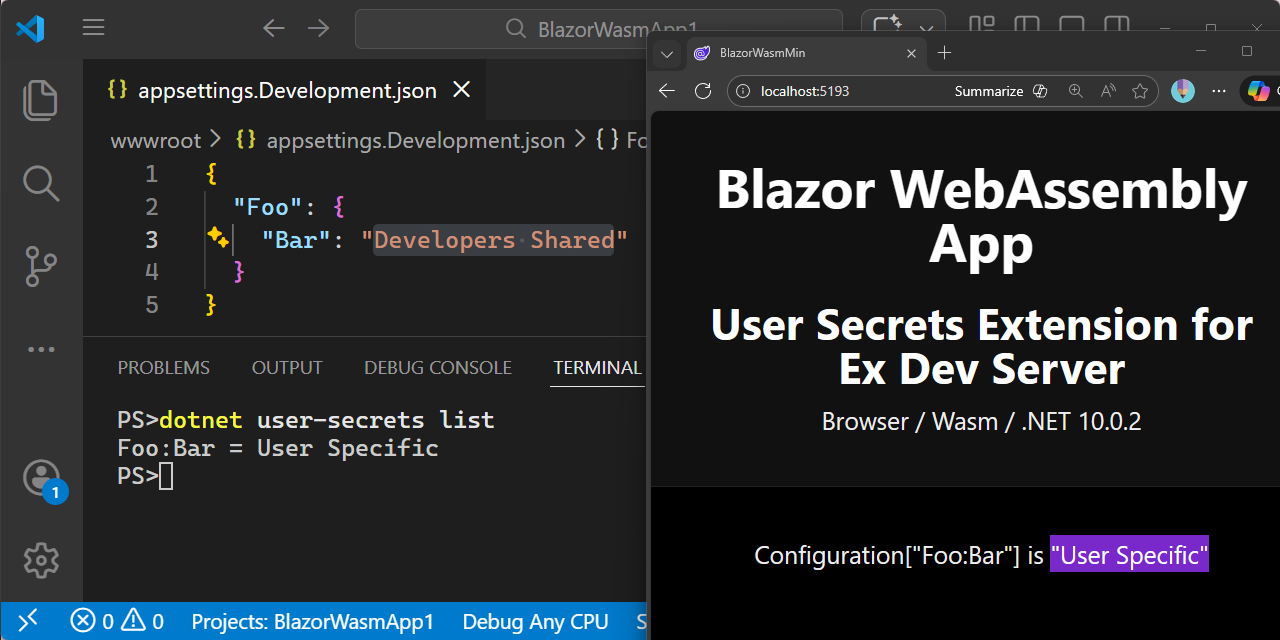
It allows developers to manage their own custom configuration settings without modifying or accidentally committing appsettings.json or appsettings.Development.json files to source control.
The Problem
In a typical Blazor WebAssembly standalone project, application configuration is served from JSON files under the wwwroot folder, such as appsettings.json and appsettings.Development.json. These files are usually committed to source control so that every team member gets a working configuration out of the box.
However, individual developers often need to temporarily override certain settings for their own environment. For example:
- REST API base URL: pointing to a local API server instead of the shared development server.
- APM (Application Performance Monitoring) API key: using a personal key for a monitoring service.
- Logging level: enabling verbose logging for a specific category during debugging.
Without this extension, the only option is to edit appsettings.Development.json directly. This leads to a common problem: the modified file gets accidentally committed, affecting the rest of the team.
The Solution
This extension adds .NET User Secrets as a third configuration layer on top of appsettings.json and appsettings.Development.json.
When installed, it intercepts HTTP GET requests for appsettings.*.json files served by the dev server and merges the User Secrets values into the response. The original JSON files on disk remain untouched. Only the HTTP response is augmented.
This means each developer can maintain their own personal overrides via User Secrets, completely separate from the shared configuration files.
User Secrets are NOT secret in this context.
Despite the name ".NET User Secrets", the values you store are not protected in any way. They are served in plain text through anonymous HTTP GET requests for appsettings.json, just like any other configuration value. In this extension, User Secrets simply act as a third configuration store, nothing more. Do not use this mechanism to store actual secrets such as passwords or tokens that must remain confidential.
How to use
Prerequisites
Your Blazor WebAssembly standalone project must use Toolbelt.Blazor.WebAssembly.ExtensibleDevServer in place of the default Microsoft.AspNetCore.Components.WebAssembly.DevServer. If you haven't done so yet, see the ExtensibleDevServer README for setup instructions.
1. Install this package
dotnet add package Toolbelt.Blazor.WebAssembly.ExtensibleDevServer.UserSecretsExtension
That's it. No additional code or configuration is required.
2. Set your User Secrets
If you are using Visual Studio, right-click your project in Solution Explorer and select "Manage User Secrets" to open the secrets.json file.
Alternatively, use the .NET CLI:
dotnet user-secrets init   # only needed once per project
dotnet user-secrets set "SomeSection:SomeKey" "my-custom-value"
3. Run your project
When you run your Blazor WebAssembly project, any HTTP GET request for appsettings.json or appsettings.Development.json will now return the original file content merged with your User Secrets. Your personal overrides take effect without any changes to the files on disk.
How it works
Browser requests GET /appsettings.Development.json
        │
        ▼
┌─────────────────────────────┐
│  Extensible Dev Server      │
│                             │
│  ┌───────────────────────┐  │
│  │ User Secrets Extension│  │
│  │                       │  │
│  │ 1. Read original JSON │  │
│  │    from wwwroot/      │  │
│  │ 2. Merge User Secrets │  │
│  │ 3. Return merged JSON │  │
│  └───────────────────────┘  │
└─────────────────────────────┘
        │
        ▼
Browser receives merged configuration
License
This project is licensed under the Mozilla Public License v2.0. See the LICENSE file for details.
Learn more about Target Frameworks and .NET Standard.
-
net10.0
- No dependencies.
NuGet packages
This package is not used by any NuGet packages.
GitHub repositories
This package is not used by any popular GitHub repositories.
v.10.0.3.1
- Fix: Expand colon-delimited keys to hierarchical structure before merging
To see all the change logs, please visit the following URL.
- https://github.com/jsakamoto/Toolbelt.Blazor.WebAssembly.ExtensibleDevServer.UserSecretsExtension/blob/main/RELEASE-NOTES.txt